Messages
- 3.7
- Rating
- 10.00M
- Installs
- Free
- Price

 Analysis by App-foxy
If you want a straightforward way to handle ordinary text messages, Messages is worth a closer look. I found it most useful as a focused communication app rather than an all-in-one social platform: it keeps the attention on sending and receiving SMS messages, while adding enough practical functions to make everyday conversations easier to manage. The app is free, aimed at Everyone, and developed by Text Messaging.
My first impression was that Messages is designed for people who want their texting experience to feel familiar quickly. You do not need to learn a complicated workspace or build a new social profile before getting anything done. The meaningful first success is simple: open a conversation, write a message, and send it to someone already in your phone. That simplicity is the main reason I would recommend trying it.
There is also a useful distinction to keep in mind. This is an SMS messaging app, so it belongs beside the standard messaging tools on a phone, not beside internet-first services such as WhatsApp, Signal, or Messenger. If most of your conversations depend on group communities, video calls, stickers, or encrypted online chats, another app may suit you better. If your priority is dependable text communication with ordinary phone contacts, Messages makes more sense.
You May Also Like

 Blood Strike: 2.5 Anniversary
Blood Strike’s Loadouts Turn Every Drop Into a Tactical Gamble
A close look at Blood Strike’s custom loadouts: how fast access to signature weapons reshapes its battle royale rhythm, rewards preparation, and narrows the gap between fights.

 Pandora - Music & Podcasts
Pandora’s Music Is Easy to Start, but Harder to Recover
Pandora’s strength is its low-effort path from a seed to a station. Its weak spot is how much confidence it asks you to place in connection, setup, and quiet recovery.

 8 Ball Pool
 Is Built on Rivalries, Rematches, and Routine
A close look at the rivalries, rematches, shared routines, and unanswered safety questions that turn a quick pool match into a persistent mobile community.

 Samsung Music
’s Quiet Strength Is Playing What You Already Own
Its reach comes less from spectacle than from dependable access to a personal library. That simplicity is both the app’s strongest retention engine and its ceiling.

 AccuWeather: Weather Radar
AccuWeather Review: A Quick, Clear Forecast for Everyday Decisions
For everyday plans, the best forecast is the one you can understand quickly. AccuWeather makes rain timing, radar, and local conditions easy to act on, with a few trade-offs.

 Hill Climb Racing
Why Hill Climb Racing Still Turns Crashes Into One More Run
A tiny car, a bumpy hill and one more upgrade: Hill Climb Racing keeps resurfacing because its simple chaos makes every near-miss feel personal.
More From Our News Desk



Getting comfortable with Messages from the first launch
I’d use the first launch to get a feel for the basic route from a contact to a conversation before changing how your phone handles texts. A quick, low-stakes test can show whether the layout feels comfortable and whether you can find a thread again easily. That gives you a useful baseline for deciding what to check next, especially when a messaging app may become part of your everyday routine.
What to expect before sending anything
Messages is listed in the Communication category and has passed the scale test that many smaller texting tools never reach: it has more than ten million installs. Its average rating is 3.8 from roughly one hundred eighty-six thousand ratings, with about ten thousand written reviews. I would read that combination as a sign of a useful but not universally loved app. It is popular enough to have a broad user base, yet the rating suggests that your experience may depend on your phone, messaging habits, and expectations.
The app is free to install, although in-app purchases range from forty-nine cents to $12.99 per item. That is important for a first-time user because the basic decision is low-risk, but you should still pay attention if the app presents optional paid items during browsing. I would start with the free experience and only consider paying after deciding whether its daily workflow is genuinely better than the messaging tool already on your phone.
Its release date was February 11, 2021, and the current version is 5.88.43. Messages supports Android 7.0 and later, so it can be relevant for people using older devices that may not run newer communication apps comfortably. That wider compatibility is practical, especially if you are helping a family member keep an aging phone useful rather than replacing it just to get a newer messaging interface.
One thing I would not expect is for Messages to replace every communication service at once. SMS is still the center of the experience. A normal text does not become a private internet chat simply because it is sent through a different interface. Depending on the recipient and the phone network, messaging behavior can differ from what you see in an internet-based service. That is not a flaw unique to this app, but it is an important boundary to understand before moving all your conversations over.
Setting it up without making the process harder
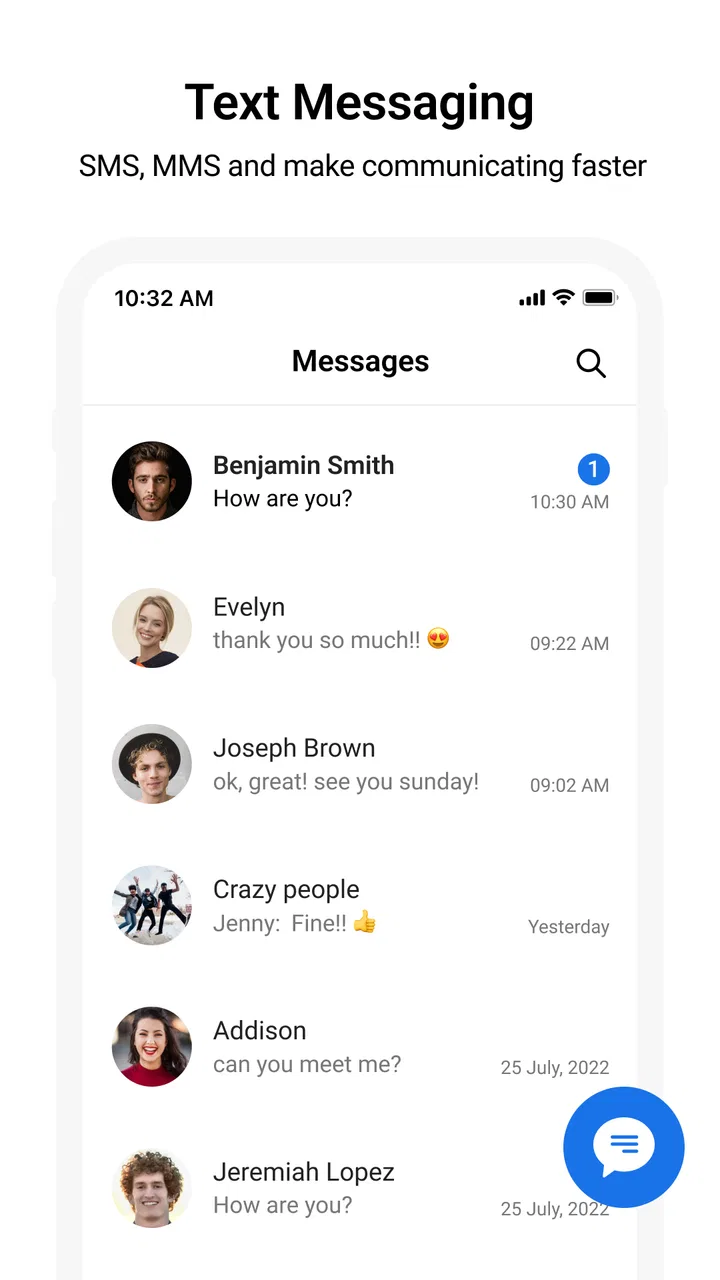
After installation, I would take a slow approach instead of immediately changing every setting. First, look through the conversation screen and identify how to begin a new message, where existing threads appear, and how an incoming reply is displayed. The goal is not to customize everything; it is to confirm that the basic path from contact to conversation feels natural on your device.
If Messages asks to become your default SMS app, think about that choice rather than accepting it automatically. Making it the default means new text messages will normally open here, and replies may be handled through this interface instead of the phone’s previous messaging application. That can be convenient, but switching back later may require visiting your phone’s app settings. I recommend changing the default only when you are ready to use Messages as your main texting tool, not merely to test it for a minute.
Before sending a real message, check that your contacts are easy to recognize. A saved name is safer than selecting a number from memory, particularly when two people have similar names or when a work contact and a personal contact are both stored. This small habit prevents a surprisingly common mistake: sending a private comment to the wrong person because the conversation list was scanned too quickly.
I also suggest keeping the first test message ordinary and low-stakes. Send a short note to someone you trust, such as asking whether they received it. This gives you a chance to see how the conversation thread looks, how replies return, and whether notifications behave as you expect. It is a more useful test than sending a long message to someone who may be confused if the app is still being configured.
The first successful action that matters
For me, the best first milestone is not exploring every powerful function. It is completing a small conversation from start to finish. Choose a familiar contact, open a new thread, type a clear sentence, send it, and wait for the reply. Then close and reopen the conversation to make sure you can find it again without searching through menus.
This simple exercise reveals whether Messages fits the way you actually communicate. You learn where the compose control is, how a thread is organized, and whether the visual layout makes it easy to distinguish your outgoing message from the other person’s reply. If that basic exchange feels comfortable, the app has already done its most important job.
A useful everyday example is coordinating a pickup. Imagine that a friend is collecting you after work and you need to confirm the meeting point while your hands are busy. I would open the existing thread instead of starting a new one, send one concise message with the location and timing, and then return to the same conversation when the reply arrives. Keeping the exchange in one thread makes the information easier to find later than scattering separate messages across several contacts.
For family communication, I would use a similar approach but with extra care around recipients. Before sending a message about a medical appointment, travel plan, or household issue, pause on the contact name and verify it. Messages can make sending feel quick, and quick is helpful until it encourages careless tapping. The app is most useful when its speed is paired with a small checking habit.
Another practical workflow is using a short text as a reminder to yourself through a trusted contact or a second number, but I would not treat the app as a dedicated notes system. Conversations become difficult to search mentally when they are filled with personal reminders, shopping lists, and unrelated fragments. Messages works best when a thread represents a real exchange rather than a storage drawer for everything you might need later.
Where new users can become confused
The most common confusion is assuming that every recipient will experience the same messaging features. SMS communication depends on the recipient’s phone and mobile service, so a conversation with one person may behave differently from a conversation with another. If a message is delayed, appears in an unexpected format, or does not behave like an internet chat, do not immediately conclude that Messages is broken. First consider whether the communication is traveling as a regular text rather than through a shared online platform.
Group conversations can also require more attention than one-to-one texting. Before starting a group thread, check every selected contact and consider whether all participants need the same information. A group message is convenient for a family plan or a small event, but it is a poor substitute for a dedicated community app when the conversation needs extensive media, organized topics, or a large membership.
Another point that deserves caution is the difference between deleting a conversation and simply clearing your view of it. A tidy conversation list can feel satisfying, but messages may contain addresses, appointment details, or instructions that you will want later. I would keep anything with practical value until the event has passed, and only then clean up old threads. This is especially sensible when you use texting for work arrangements or travel coordination.
Notifications are another area where the phone itself matters. If an expected message does not appear promptly, check the device’s notification behavior and battery restrictions before blaming the app. Older phones and heavily customized Android interfaces can handle background activity differently. A first-time user who depends on urgent texts should test the notification path with a friend rather than assuming every incoming message will demand attention in exactly the same way.
Privacy expectations deserve a realistic explanation too. Messages is convenient for SMS, but convenience should not be confused with the privacy model of a dedicated secure messenger. If you need a service built around encrypted internet conversations, disappearing messages, or private group communication, compare Messages with an app designed specifically for those purposes. I would choose this app for ordinary texting, not for sensitive discussions that require stronger communication controls.
How it compares with the usual alternatives
The obvious alternative is the messaging app that came preinstalled on your phone. That option has one major advantage: it is already integrated into the device, so there may be less setup and less uncertainty about becoming the default. Messages becomes more appealing when you prefer its layout, its collection of practical functions, or its way of organizing conversations. The deciding factor is not the label on the icon; it is whether you can complete common tasks with fewer awkward steps.
Internet-based services such as WhatsApp and Messenger are often better for people who regularly send photos, share media, make calls, or participate in active groups. They can provide a richer shared environment, but they also require the other person to use the same service and generally rely on an internet connection. Messages has the advantage of staying centered on regular phone texting, which is useful when you are contacting people who do not share your preferred chat platform.
Signal is a stronger candidate when privacy is your first concern. Its purpose and workflow are different, and it is not simply a replacement interface for every SMS conversation. I would use a private messenger for sensitive online discussions and keep Messages for ordinary texts, appointment confirmations, delivery coordination, and contacts who communicate by standard phone messaging.
For business teams, a workplace chat tool may be more suitable than any SMS application. Team channels, searchable files, managed accounts, and organized project discussions are not what I would expect to handle comfortably in a personal messaging app. Messages is better at quick, direct communication than at building a structured work archive.
Useful habits that make the app easier to live with
My first tip is to prefer replying inside an existing thread whenever the topic is already there. Starting a fresh message to the same person can split a conversation into several places, making it harder to reconstruct plans later. This matters most for travel, appointments, deliveries, and anything where the latest reply changes what you need to do next.
My second tip is to write messages that can stand on their own. Instead of sending “Are you still coming?” after a long gap, include the event or location: “Are you still coming to the library at six?” A clear message reduces back-and-forth and helps the recipient understand the question even if the thread is busy. This is a writing habit rather than a flashy feature, but it improves the app’s usefulness immediately.
My third tip is to use Messages as a communication queue, not as a permanent record. If someone sends an address or a booking detail, copy the information into the appropriate calendar, notes area, or travel document after you act on it. Conversation threads are excellent for context and replies, but they are not always the easiest place to manage information you will need repeatedly.
A fourth trade-off is worth remembering when you are deciding whether to make it your default. A single messaging app reduces confusion because you know where incoming texts will appear. At the same time, committing to a new default can make the old app feel unfamiliar if you switch back and forth. I would test Messages for several ordinary conversations first, then make a deliberate choice rather than changing defaults repeatedly.
Who should use it, and who should skip it
I think Messages is a good fit for someone who wants a dedicated SMS tool with a familiar learning curve and more flexibility than a bare-bones texting screen. It is also reasonable for people using older Android phones because the minimum operating system is Android 7.0. Families helping a relative with phone basics may appreciate the focused purpose: the app is about messages, not an endless feed of unrelated content.
It can also suit a person who communicates with a mixed group of contacts. Some friends may prefer internet chat, while relatives, service providers, or occasional contacts may still use regular SMS. Messages gives you a practical place for those direct text exchanges without requiring every recipient to join a new platform.
I would skip it if your main need is secure private communication, extensive video calling, large online communities, or a full workplace collaboration system. I would also hesitate if your current default messaging app already feels perfectly comfortable and you have no specific problem to solve. Installing another SMS interface only adds value when its workflow is clearer or its functions fit your habits better.
People who dislike checking recipients should be especially careful. The app makes ordinary texting accessible, but accessibility can encourage speed. If you frequently send sensitive information, manage many similar contacts, or need strict organizational controls, take extra time to verify names and threads—or choose a service designed around the safeguards you need.
My final take after using it as an everyday texter
Messages succeeds when I treat it as a practical tool rather than expecting it to become my entire communication life. Its strongest quality is the direct path from opening the app to completing a normal text conversation. The free entry point, Everyone rating, broad Android compatibility, and substantial install base make it easy to try without committing to a complicated ecosystem.
The limitations are equally clear. It is still centered on SMS, so it does not automatically offer the richer online features or privacy approach of specialized chat services. The average rating of 3.8 also tells me to keep expectations sensible: this is not a flawless replacement for every built-in messaging experience. Device behavior, notification handling, and personal preference will influence whether it feels like an upgrade.
My recommendation is to install it, test one low-stakes conversation, and pay attention to three things: how quickly you can find a contact, how clearly you can follow the thread, and whether incoming replies appear in a way you trust. If those basics work, explore its additional functions gradually instead of changing every habit on the first day. The best first step is a real, simple conversation—not a tour through every setting.
For me, Messages is most convincing as a focused, everyday SMS companion. It is a sensible choice for direct texting across a varied contact list, especially when you value a dedicated interface and do not need a private internet messenger or a team workspace. Try it with realistic conversations, keep important details organized elsewhere, and decide on the default-app switch only after the first few successful exchanges.
FAQs for Messages
01What features does the Messages app offer?
The Messages app provides a range of features, including text messaging, multimedia sharing, stickers, and emojis. It supports group chats, voice messages, and video calls. Additionally, the app integrates with other services like Google Assistant or Apple’s Siri for enhanced functionality and convenience.
02Is the Messages app secure and private?
Yes, the Messages app employs end-to-end encryption for its chats, ensuring that your conversations remain private and secure. This means only you and the person you’re communicating with can read the messages. The app also offers options for two-factor authentication to add an extra layer of security.
03Can I use the Messages app on multiple devices?
The Messages app can be used across multiple devices, including smartphones, tablets, and computers. You can sync your conversations by signing into your account on each device. This feature ensures seamless communication, allowing you to pick up conversations where you left off, regardless of the device.
04Does the Messages app support multimedia sharing?
Yes, the Messages app supports sharing various multimedia content such as photos, videos, GIFs, and audio clips. You can also send documents and other file types, making it a versatile tool for both personal and professional communication. The app ensures that the media quality is maintained during sharing.
05Are there customization options available in the Messages app?
The Messages app offers several customization options, including themes, chat backgrounds, and notification settings. Users can personalize the app to suit their preferences by choosing from a variety of themes or setting specific notification tones for different contacts or groups, enhancing the overall user experience.
Pros
- User-friendly interface for easy navigation.
- Supports multiple media types in chats.
- Seamless integration with other apps.
- End-to-end encryption for security.
- Customizable notification settings.
Cons
- Lacks advanced customization options.
- No scheduled messaging feature available.
- Limited cloud storage for media files.
- Occasional sync issues between devices.
- Ads can be intrusive at times.

Messages
Gallery